Email works for approvals until it doesn't. One file and one reviewer, fine. But by the third round, with two people on the client side and a PDF that keeps growing, feedback ends up scattered across threads, attachments and versions nobody can match up. Online proofing puts the file, the comments and the final sign-off in one place, and it doesn't ask more of your client than opening a link.
IN SHORT
Email breaks approvals in five places: scattered feedback, lost versions, file size limits, no approval record and internal notes mixed with client feedback.
If your clients review PDFs, print and campaign variations, an online proofing tool like Miriad fixes all five without asking them for a password.
5 ways email breaks approvals
1. Feedback is scattered
One client replies in the email body, another annotates the PDF, a third sends a screenshot with red circles. Your designer has to rebuild the full list of changes before touching the file, and something always slips through.
2. Nobody knows which version is the latest
"brochure_final_v5_OK_def.pdf" is a running joke for a reason. With attachments, each version lives in someone's inbox, and clients regularly comment on an old one. The fix you made yesterday gets flagged again today.
3. Files are too heavy
Gmail caps attachments at 25 MB on personal accounts and turns anything heavier into a Google Drive link, as Google's help center explains. A print-ready catalog goes well past that, so the file leaves the thread, often through a transfer service whose link expires.
4. "Looks good" isn't an approval
A quick reply on a phone doesn't say which version was approved, or whether the person replying had the authority to approve it. When a client disputes a change after printing, you dig through threads instead of pointing to a record.
5. Internal notes leak to the client
Someone hits "reply all" on the wrong thread, and your art director's frank comments end up in the client's inbox. With email, your team and your client share the same channel, and only discipline keeps them apart.
Side by side
Email approvals vs online proofing
| Online proofing | ||
|---|---|---|
| Feedback | ||
| Feedback | Scattered across threads and attachments | Placed directly on the file |
| Versions | ||
| Versions | Files named final_v5_OK | Every version stacked in one place |
| Client access | ||
| Client access | Links that expire | One link that keeps working |
| Approval record | ||
| Approval record | “Looks good” in a reply | Name and version on record |
| Internal notes | ||
| Internal notes | Same thread as the client | Kept in a separate circle |
What it costs you
Each of these problems adds a round. IPA data reported by Marketing Week shows the average number of revision rounds before approval went from 3 in 2007 to 5 today. Not all of that comes from email, but unclear, scattered feedback is the main driver, and email makes it worse.
Rounds of revisions before approval
The average number of revisions before approval went from 3 in 2007 to 5 today.
For an agency selling a fixed number of rounds, each extra round is unbilled work. For an in-house team, it's a launch that slips by a week.
How online proofing fixes each problem
| Problem | With email | With online proofing |
|---|---|---|
| Scattered feedback | Threads, PDFs and screenshots | Every comment pinned on the file |
| Versions | Files renamed by hand | Versions stacked in order, easy to compare |
| Heavy files | 25 MB cap, transfer links that expire | One link that keeps working |
| Approval | "Looks good" in a reply | Name and version on record |
| Internal notes | Same thread as the client | Separate spaces for team and client |
When email is still fine
Not every file needs a proofing tool. Email still works when:
-
One reviewer looks at one small file, like a social post or a banner.
-
The feedback is a simple yes or no, with no detailed changes.
-
There's no need to prove later who approved what.
As soon as you have several reviewers, several rounds or a document of more than a few pages, the time saved by a tool exceeds the time spent setting it up.
How to switch without losing your clients
-
Pick a tool that asks nothing of your clients. No seat to buy, no password to create. Otherwise they'll keep replying by email.
-
Keep email as the notification. Send the review link in your usual email so the client knows who it's from and why.
-
Start with one project where email clearly hurts, like a long brochure or a multi-format campaign.
-
Ask for an explicit approval at the end of each round instead of a reply.
-
Archive the old thread once the project moves, so nobody goes back to it out of habit.
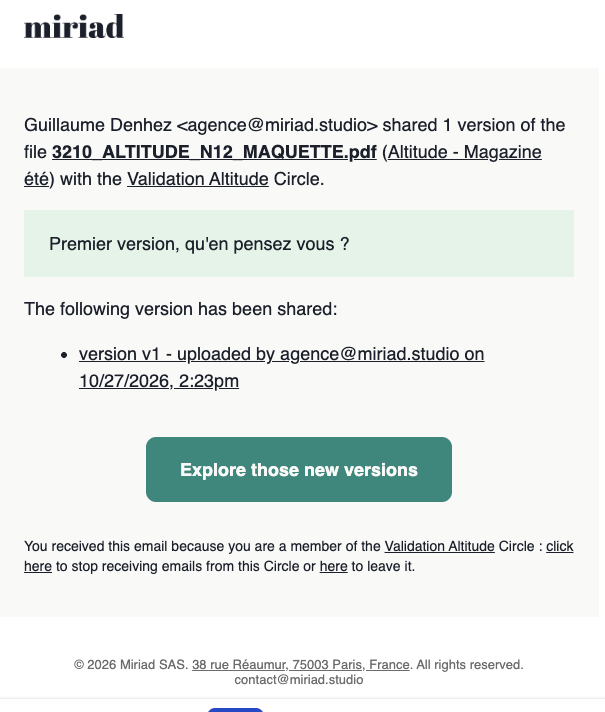
In Miriad, clients sign in with a link sent by email, with no password, which removes the main reason they'd stick to attachments.
Move your next approval out of the inbox. Miriad is free for 14 days, with no card required. Create your workspace in 2 minutes.
Your questions about online proofing and email
Is online proofing worth it for a small team?
Yes, as soon as you send more than a few files a month for review. The time you save comes from fewer clarification emails and fewer comments on the wrong version, not from the tool itself. Most tools have a free plan to test it.
Will my clients accept a new tool?
They will if it asks nothing of them. With a tool like Miriad, the client gets a link by email, signs in without a password and comments on the file. From their side, it's barely different from opening an attachment.
Can I still use email with an online proofing tool?
Yes, and you should at first. Send the review link in your usual email, so the client recognizes the sender and the context. Email becomes the notification, the file and the feedback live in the tool.
What about sending PDFs with comments in Acrobat?
It works for one reviewer. With several reviewers, you end up with several annotated copies to merge by hand. Acrobat's shared reviews solve this but ask recipients to sign in to an Adobe account.
Our sources
-
Marketing Week, "Only a third of agencies believe they receive constructive feedback", March 4, 2025, with IPA data.
-
Google, Send attachments with your Gmail message, Gmail Help Center.
-
Adobe, Share PDFs for review, Acrobat documentation updated April 1, 2026.