Proofing is the feedback loop: reviewers look at a creative file, comment on it, and you produce a new version. Approval is the decision at the end of that loop: one person signs off on one specific version. The two words get used interchangeably, but they are two different steps, and treating them as one is how agencies end up printing the wrong file.
IN SHORT
Proofing gathers feedback from several people over several versions. Approval is one decision, by one person, on one version.
A good tool, like Miriad, handles both and keeps a record of who approved which version.
Two different steps
Proofing gathers feedback, approval makes the decision
Proofing
- Reviewers annotate the file
- Comments lead to a new version
- V1 → V2 → V3
Approval
- One person signs off
- On one specific version
- With the approver's name on record
What proofing means
The word comes from printing. A proof was a test print that let the client and the printer check a job before the full run. Today, proofing covers any review of a creative file before it's final: a PDF brochure, a banner, a packaging layout or a video.
During proofing, several people can comment: the designer, the art director, the client's marketing lead, sometimes legal. Each round of comments leads to a new version, V1, V2, V3, until nobody has anything left to change.
What approval means
Approval is a decision with a name on it. It answers three questions: who approved, which version, and when. In print, it's the signed proof. In a digital workflow, it's the moment a client clicks "approve" on V4 rather than replying "looks good" to an email.
Approval also has consequences. Once a file is approved, changes cost money, especially after it goes to the printer or the media buyer. That's why the record matters as much as the decision.
The print example: the contract proof
Print is where the difference is clearest. Before a run, the printer produces a contract proof, a color-accurate print the client signs. The ISO 12647-7 standard defines how these proofs are made so that the press run can match them.
Everything before the contract proof is proofing: comments on the layout, corrections to the text, color tweaks. The signature on the contract proof is approval. If the run doesn't match the signed proof, the printer is responsible. If it does, the client is.
Why mixing them up causes problems
-
The wrong version goes to production. If the approval isn't tied to a version, "approved" can mean V3 to the client and V4 to the studio.
-
Feedback never ends. Without a clear approval step, reviewers keep adding comments, and each comment opens a new round.
-
Nobody knows who has the final say. Five people comment, and the one who was supposed to approve never did.
-
Disputes have no answer. After printing, "I never approved that" is hard to argue with if all you have is a thread.
Revision rounds are already growing: IPA data reported by Marketing Week shows the average went from 3 in 2007 to 5 today. A clear line between proofing and approval is one of the simplest ways to stop that number from growing further.
Proofing and approval side by side
| Proofing | Approval | |
|---|---|---|
| Purpose | Collect feedback and improve the file | Decide the file is final |
| Who | Everyone involved | One named person per stakeholder |
| When | Every round, V1 to Vn | Once, on one version |
| Output | Comments and a new version | A record with a name and a date |
| In print | Corrections on PDF proofs | The signed contract proof |
How a tool handles both
An online proofing tool separates the two steps naturally. Reviewers annotate each version, you upload the next one on top, and when the file is ready, the approver signs off on that specific version.
-
Upload V1 and invite reviewers, with your team and your client in separate spaces.
-
Collect comments pinned on the file, then upload V2 on top of V1.
-
Repeat until no comments are left open.
-
Ask the named approver to approve the final version.
-
Keep the record: the approval stays attached to that version, with the approver's name.
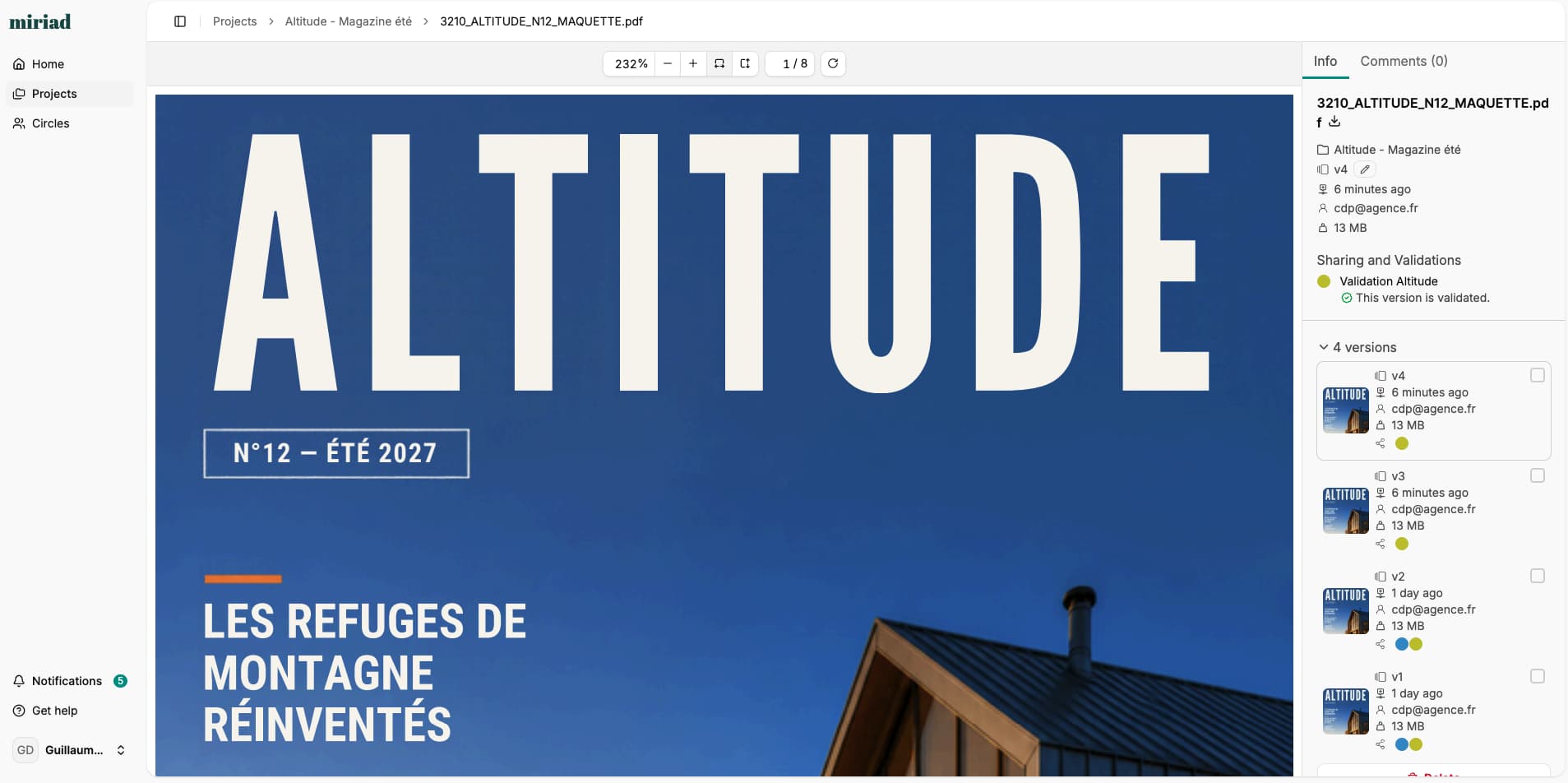
In Miriad, clients sign in with a password-free link and approve directly on the version they reviewed. For more on picking a tool, read how to choose creative approval software, or compare tools in our guide to the best online proofing software.
Separate feedback from decisions on your next project. Miriad is free for 14 days, with no card required. Create your workspace in 2 minutes.
Your questions about proofing and approval
Is proofing the same as proofreading?
No. Proofreading checks text for typos and grammar. Proofing covers the whole creative file, layout, images, colors and text, and collects feedback from everyone involved.
Who should approve a creative file?
One named person per stakeholder, decided before the project starts. Several people can comment during proofing, but the approval should come from someone with the authority to say yes.
What is a contract proof in printing?
It's a color-accurate print of the final file that the client signs before production. The printer then matches the press run to it. The ISO 12647-7 standard defines how these proofs are produced.
Can one tool handle both proofing and approval?
Yes. Most online proofing tools collect comments on each version and record the final approval. In Miriad, reviewers annotate each version, then the client approves the final one, and the approval is recorded with their name on that version.
Our sources
-
ISO, ISO 12647-7: Proofing processes working directly from digital data.
-
Marketing Week, "Only a third of agencies believe they receive constructive feedback", March 4, 2025, with IPA data.